Introduction
During a multi-agency response to a hurricane, a county emergency manager watches helplessly as critical resource requests get lost between incompatible systems. Fire, EMS, and utilities struggle to coordinate because their incident management platforms can't communicate. Response times lag. Confusion spreads.
This scenario plays out across emergency operations centers nationwide because many agencies struggle with outdated, disconnected incident management software. For emergency operations centers, public safety agencies, and emergency management organizations, choosing the right platform directly impacts response times, regulatory compliance, multi-agency coordination, and ultimately, the protection of lives and property.
Modern emergency management has evolved from paper logbooks and radio dispatches to sophisticated digital platforms coordinating dozens of agencies in real-time. FEMA compliance standards now define system requirements, and federal grant eligibility often depends on implementing approved incident management technology.
Key Takeaways
- Centralized coordination across agencies and jurisdictions accelerates emergency response
- Eight features distinguish effective platforms: compliance, collaboration, mobile access, automation, and scalability
- Faster response times and regulatory compliance come from choosing the right system
- Proven deployments and compliance certifications indicate vendor reliability
- Intuitive usability ensures adoption across all personnel skill levels
What is Incident Management Software?
Incident management software is a digital platform that enables organizations to detect, coordinate, respond to, and document emergency incidents and critical events in real-time.
Unlike IT incident management tools focused on system outages and service disruptions, emergency incident management software addresses physical security threats, natural disasters, public safety events, and multi-agency emergency response operations.
These platforms integrate several core capabilities to support the full lifecycle of emergency response.
Core Components of Incident Management Software
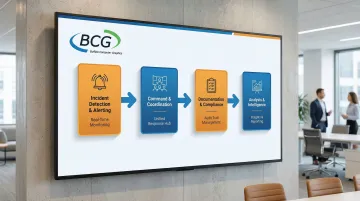
Incident Detection & Alerting
Systems capture incidents from multiple sources—emergency calls, sensor networks, automated integrations—and immediately notify appropriate responders based on incident type, location, and severity.
This removes the dangerous delays inherent in manual notification processes.
Command & Coordination
Digital command center capabilities enable incident commanders to manage resources, track response activities, and coordinate across teams from a unified platform. According to DHS research on incident management systems, effective platforms provide "multiagency coordination, asset tracking, resource allocation and prioritization" through a shared Common Operating Picture.
Documentation & Compliance
Structured forms and workflows ensure complete incident documentation meeting regulatory standards like NIMS (National Incident Management System), ICS (Incident Command System), and FEMA guidelines. This documentation protects organizations from liability and supports grant reporting requirements.
Analysis & Intelligence
Post-incident reporting and trend analysis convert incident data into insights for prevention and preparedness. These analytics identify patterns across incident types, locations, and timeframes that inform training, staffing, and resource allocation decisions.
Why Organizations Need Incident Management Software
Manual, paper-based, or fragmented digital systems create dangerous gaps in situational awareness, slow response times, and increase liability exposure during emergencies. RAND research on emergency management found that "poor integration" of systems leads to "disjointed reporting" and a "lack of shared situational awareness," which can "contribute to the worsening of disaster outcomes."
These gaps become catastrophic during complex emergencies. Modern threats—active shooters, cyberattacks, natural disasters, pandemics—require coordinated response across multiple agencies and jurisdictions that spreadsheets and email cannot support.
During Hurricane Katrina, manual processes and friction in new plans significantly impeded FEMA's initial response, highlighting the critical need for integrated digital coordination.
Regulatory requirements make purpose-built software essential:
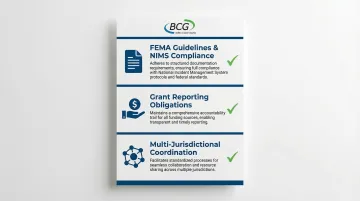
- FEMA guidelines and NIMS compliance demand structured documentation that manual systems cannot consistently deliver
- Grant reporting obligations require accountability trails that spreadsheets fail to provide
- Multi-jurisdictional coordination needs standardized processes to prevent the "persistent regional coordination failures" identified in a 2016 GAO report
Only specialized incident management platforms provide the structure and consistency needed to meet these requirements across jurisdictions.
8 Critical Features to Look for in Incident Management Software
While many platforms claim to offer incident management capabilities, only those with these eight critical features can truly support effective emergency response operations. These features reflect both industry best practices and real-world operational requirements from organizations managing thousands of incidents annually.
1. NIMS and ICS Compliance
NIMS (National Incident Management System) and ICS (Incident Command System) are federally mandated frameworks for emergency management that ensure interoperability across agencies.
NIMS provides the "shared vocabulary, systems, and processes" required for different organizations to work together effectively during emergencies.
Why this matters: Organizations receiving federal grants, working with FEMA, or coordinating with multiple agencies must demonstrate NIMS/ICS compliance. Non-compliant systems create legal and operational risks that can jeopardize funding and response effectiveness.
FEMA's Preparedness Grants Manual explicitly ties federal grant eligibility to proven NIMS implementation.
FEMA's NIMS Supporting Technology Evaluation Program (NIMS STEP) provides an objective process to evaluate incident management software against NIMS criteria. BCG's DisasterLAN is the first and only incident management system evaluated by FEMA's NIMS STEP program as fully compliant with NIMS and ICS principles and interoperability communications standards.
2. Real-Time Collaboration and Communication
Effective incident response requires immediate information sharing across command staff, field responders, and supporting agencies. Without real-time collaboration, organizations face the coordination failures that plague major incidents.
Key capabilities to evaluate:
- Multi-user access with role-based permissions
- Shared situational displays providing a Common Operating Picture
- Integrated communication channels
- Real-time visibility into who's doing what and when
- Conflict prevention for simultaneous updates
Real-world application: During a severe weather event, multiple teams need simultaneous access to update shelter status, resource deployment, and damage assessments.
Real-time collaboration ensures everyone works from the same current information, preventing the dangerous confusion that occurs when teams operate on outdated data.
3. Mobile Accessibility for Field Operations
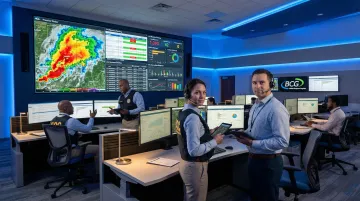
Incidents don't happen at desks. First responders, emergency managers, and field personnel need full system access from smartphones and tablets in any environment, including areas with limited or no connectivity.
Critical mobile capabilities:
- Offline functionality for areas without network coverage
- Photo and video capture for documentation
- GPS location tracking for resource positioning
- Simplified interfaces optimized for small screens
- Full functionality, not limited "mobile view"
DHS research found that 84% of field responders require offline data capture, yet many mobile solutions lack reliable offline synchronization.
Mobile access shouldn't be an afterthought. Systems need fully functional field command capabilities that match desktop functionality.
4. Automated Workflows and Notifications
Automation reduces human error during high-stress incidents and ensures consistent execution of established procedures. Research on automation in emergency operations shows that appropriate automation can reduce human error rates from 12% to 3% and lower cognitive load by 38%.
Automation features to look for:
- Automatic notifications based on incident type and severity
- Workflow triggers that assign tasks to specific roles
- Escalation protocols when response timelines aren't met
- Integration with external alerting systems
- Validation tools that prevent incomplete documentation
In practice: When a fire alarm activates, the system should automatically notify on-duty fire safety staff, create an incident record with building details pre-populated, initiate evacuation procedures, and escalate to the fire department if not resolved within a defined timeframe—all without manual intervention.
5. Comprehensive Reporting and Analytics
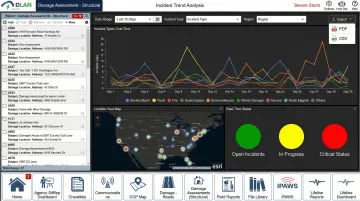
Reporting serves dual purposes: immediate operational intelligence during active incidents and long-term trend analysis for prevention and preparedness.
Reporting capabilities to evaluate:
- Customizable dashboards for different user roles
- Real-time incident status displays
- After-action report generation
- Trend analysis across incident types, locations, and times
- Compliance reporting for grants and audits
- Export capabilities for external analysis
Effective analytics identify patterns—recurring issues at specific locations, seasonal trends, resource gaps—that inform training, staffing, and preparedness decisions. This data helps organizations shift from purely reactive response to proactive prevention.
6. Integration with Existing Systems
Incident management software must connect with an organization's broader technology ecosystem instead of operating as an isolated silo. Integration eliminates manual data transfer and ensures information flows seamlessly across platforms.
Key integration points to consider:
- Mass notification systems for public alerting
- Access control and video surveillance systems
- Weather and threat intelligence feeds
- CAD (Computer-Aided Dispatch) systems
- GIS mapping platforms
- Emergency operations center displays
Integration capabilities should be flexible—supporting APIs, webhooks, and data exports—to accommodate both current systems and future technology additions. FEMA emphasizes that "interoperable communications systems" enable personnel to communicate "within and across jurisdictions," making integration a compliance requirement, not just a convenience.
7. Scalability and Multi-Site Management
Organizations grow, add facilities, expand jurisdictions, or need surge capacity during large-scale incidents affecting multiple locations simultaneously. Scalable architecture ensures the platform grows with your needs.
What scalable architecture looks like:
- Ability to manage incidents across unlimited sites from a single platform
- Hierarchical organizational structures
- Shared templates and procedures with site-specific customization
- Performance that doesn't degrade with increased user load
- Support for both routine single-site and complex multi-jurisdiction incidents
Consider this scenario: A county emergency management agency should be able to manage routine single-site incidents (building evacuation) and coordinate complex multi-jurisdiction disasters (hurricane response across 20+ municipalities) within the same platform without switching systems or workflows.
8. Training and Exercise Management
The best incident management software supports exercises and drills using the same interface responders will use during actual emergencies. This eliminates the dangerous disconnect many organizations face where training happens in classroom settings but actual incidents use completely different tools and workflows.
Training features to look for:
- Exercise mode that simulates incidents without triggering real notifications
- Ability to inject scenarios and injects during drills
- After-action review tools that identify gaps in procedures or training
- Integration with Incident Action Plans (IAPs)
- Performance metrics for individual and team assessment
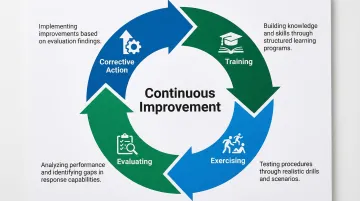
FEMA requires a "continuous cycle of training, exercising, evaluating, and taking corrective action" for NIMS compliance. Software that supports this entire cycle ensures responders are truly prepared when real incidents occur.
How to Evaluate Incident Management Software Vendors
The vendor is as important as the software—you're entering a long-term partnership that will support your most critical operations during your organization's worst moments.
Proven Track Record and Deployments
Look for vendors with extensive deployments in organizations similar to yours. Ask for customer references, case studies, and evidence of systems operating successfully under real emergency conditions.
A vendor's claims matter less than their documented performance during actual disasters.
Compliance Certifications and Industry Recognition
Verify that vendors hold relevant certifications and have undergone third-party validation. FEMA's NIMS STEP program provides objective evaluation of incident management systems against NIMS criteria. Be wary of vendors making compliance claims without independent verification.
Long-Term Stability and Support
Evaluate the vendor's history, financial stability, and support infrastructure. Emergency management software must be reliable 24/7/365, and vendor outages during your crisis are unacceptable.
Consider whether the vendor is an established company with a track record or a startup that may not survive market changes.
Implementation and Training Services
Assess what's included in implementation and ongoing training:
- System configuration and data migration
- Integration with existing systems
- User onboarding and refresher courses
- Procedure updates and documentation
These should be part of the vendor's commitment, not expensive add-ons.
How BCG's DisasterLAN Can Help
Buffalo Computer Graphics (BCG) brings 43 years of experience providing mission-critical incident management solutions to government, military, and emergency management organizations across 300+ deployments.
Founded in 1982, BCG has evolved from radar simulation systems to emergency management platforms that serve agencies nationwide.
Their flagship platform, DisasterLAN, holds a unique distinction: it's the first and only incident management system evaluated by FEMA's NIMS STEP program as fully compliant with NIMS and ICS principles and interoperability communications standards.
This third-party validation ensures organizations using DisasterLAN meet federal compliance requirements for grant eligibility and multi-agency coordination.
Comprehensive Feature Set
DisasterLAN includes:
- Template-guided Incident Action Plans aligned with FEMA guidelines
- Flexible deployment options (cloud or on-premises)
- Bandwidth-based licensing that scales with organizational needs rather than per-seat fees
- Rapid support and customization from BCG's in-house engineering team
Proven Customer Base
BCG's customers span emergency management agencies, public safety, military/DoD, healthcare, utilities, and infrastructure sectors, with proven performance in real-world disasters and daily operations. This diverse deployment base demonstrates DisasterLAN's flexibility across different operational environments and incident types.
Customer-Focused Approach
As a privately held, veteran-owned US company, BCG answers to customers rather than stakeholders, focusing on long-term customer success over short-term financial metrics.
This approach has earned BCG recognition as one of America's fastest-growing companies (Inc 5000) and a Technology Fast 500 company.
Conclusion
Selecting incident management software is not about finding the most feature-rich or popular solution, but rather identifying the platform that aligns with your organization's operational requirements, compliance obligations, and response procedures.
The eight critical features outlined here—NIMS/ICS compliance, real-time collaboration, mobile accessibility, automation, reporting, integration, scalability, and training support—separate effective platforms from basic logging systems.
The investment in proper incident management software pays dividends through faster response times, reduced liability exposure, improved regulatory compliance, and most importantly, better protection of lives and property.
When evaluating vendors, prioritize proven deployments, third-party compliance validation (such as FEMA NIMS STEP program certification), and long-term stability over flashy features or aggressive sales pitches. Platforms like Buffalo Computer Graphics' DLAN, with 300+ deployments and 43 years of operational experience, demonstrate the reliability necessary for mission-critical operations.
Effective incident management is not a one-time implementation but an ongoing commitment to continuous improvement. The right software platform evolves with your organization, incorporating lessons learned from each incident to strengthen future response capabilities.
As threats become more complex and coordination requirements increase, the technology supporting your emergency operations must be a strategic asset, not an administrative burden.
Frequently Asked Questions
What are the features of incident management?
Core features include real-time alerting, command and coordination tools, automated workflows, mobile access, multi-agency collaboration, comprehensive documentation, and reporting analytics. Effective platforms also provide resource management, situational awareness displays, and NIMS/ICS-compliant reporting.
What are the 5 C's of incident management?
The 5 C's are Command (authority and structure), Control (resource direction), Communication (information sharing), Coordination (team synchronization), and Common Operating Picture (shared awareness). Quality software supports these principles through unified command structures and real-time information sharing.
What's the difference between IT incident management and emergency incident management software?
IT incident management handles technology outages (servers, applications, networks), while emergency incident management addresses physical security, public safety, and natural disasters. Emergency platforms require NIMS compliance, multi-jurisdiction coordination, and field operation capabilities that IT service management tools lack.
How much does incident management software typically cost?
Annual costs range from several thousand dollars for small deployments to six figures for enterprise implementations, depending on deployment model, licensing structure, and features. Evaluate total cost of ownership including implementation, training, support, and scalability—not just licensing fees.
Do we need incident management software if we already have a mass notification system?
Yes—they serve complementary purposes. Mass notification sends alerts to populations, while incident management coordinates response activities, documents actions, and manages resources. Effective programs integrate both systems, but each serves a distinct function.
How long does it take to implement incident management software?
Basic implementations take 4-8 weeks, while complex multi-site deployments require 3-6 months. Timeline depends on organizational readiness (defined procedures, stakeholder buy-in, data preparation) as much as technical configuration.