Introduction
Workplace safety incidents carry staggering costs. The National Safety Council estimates workplace injuries cost organizations $176.5 billion annually, while OSHA penalties for willful violations now reach $165,514 per offense.
Despite a decline in total recordable cases—2.5 million injuries in 2024, down 3.1% from 2023—workplace fatalities remain stubbornly high, with 5,283 deaths recorded in 2023.
Incident management software has evolved from basic logbooks into sophisticated platforms that support the entire safety lifecycle. Today's solutions transform raw incident data into actionable insights through:
- Mobile reporting from any location
- Automated investigation workflows
- Corrective action tracking with accountability
- Predictive analytics that identify risk patterns
These capabilities prevent future harm and strengthen organizational safety culture by making incident response faster, more thorough, and data-driven.
Key Takeaways
- Documents, investigates, and prevents workplace incidents while maintaining compliance
- Essential features: mobile reporting, automated workflows, root cause analysis, real-time alerts, and OSHA reporting
- Top solutions serve different needs: enterprise EHS platforms, FEMA-compliant emergency systems, and industry-specific tools
- Select based on compliance needs, usability, integrations, and scalability
Overview of Incident Management Software in Workplace Safety
What Is Workplace Incident Management Software?
Workplace incident management software is built specifically for EHS teams to manage safety events through their complete lifecycle. These events include injuries, near-misses, property damage, and violations.
Unlike IT incident management or basic tracking systems, these platforms include OSHA reporting, root cause analysis, and corrective action workflows designed for safety professionals. The software creates a proactive safety culture by capturing incidents immediately, investigating thoroughly, and analyzing trends to prevent recurrence.
The Incident Lifecycle
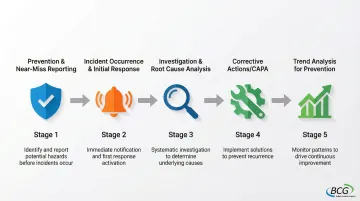
Effective platforms support five critical stages:
- Prevention & Near-Miss Reporting: Digital inspections catch risks before incidents occur, while near-miss reporting encourages frontline workers to flag potential dangers
- Incident Occurrence & Initial Response: Mobile apps capture scene details (photos, witness statements, location data) while triggering immediate alerts to safety personnel
- Investigation & Root Cause Analysis: Built-in tools like 5 Whys and Fishbone diagrams guide investigators beyond surface symptoms to identify systemic failures
- Corrective Actions (CAPA): Automated workflows assign remediation tasks, track completion, and verify effectiveness to prevent recurrence
- Trend Analysis for Prevention: Analytics dashboards identify patterns like frequent injury types, high-risk locations, and seasonal trends that inform strategic safety decisions
The Market Landscape
The global EHS software market reached $1.9 billion in 2023 and is projected to grow at 14.6% annually, reaching $4.5 billion by 2029. Organizations face mounting regulatory requirements and ESG reporting demands.
The market includes:
- Specialized EHS platforms focused on safety compliance and industrial hygiene
- Integrated safety suites combining EHS with quality management on enterprise platforms
- Emergency management systems serving public safety and government agencies
- Industry-specific solutions tailored for sectors like higher education or manufacturing
Top 5 Incident Management Software Solutions for Workplace Safety
Selection criteria include OSHA/regulatory compliance capabilities, user adoption and ease of use, mobile accessibility, investigation tools, and proven track record in workplace safety environments.
ComplianceQuest
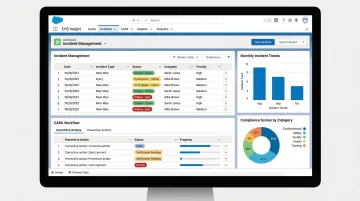
ComplianceQuest is a cloud-based QHSE (Quality, Health, Safety, Environmental) platform built natively on Salesforce.
Its comprehensive approach integrates incident management with quality systems, CAPA, and risk management—making it particularly valuable for regulated industries where safety and quality intersect.
Key Differentiators:
- Salesforce foundation delivers enterprise-grade scalability, security, and familiar interface for existing Salesforce users
- Incidents automatically trigger quality investigations and CAPA workflows for unified risk management
- Advanced analytics use Salesforce's reporting engine
- Scales seamlessly for global operations with multiple facilities and regulatory jurisdictions
| Category | Details |
|---|---|
| Best For | Large enterprises in regulated industries (manufacturing, pharmaceuticals, food & beverage) needing integrated quality and safety management |
| Key Strengths | Salesforce-based platform, integrated CAPA and risk management, strong compliance reporting, scalable for global operations |
| Considerations | Enterprise-level pricing, may be more complex than needed for organizations only seeking incident management, requires Salesforce familiarity for maximum benefit |
Buffalo Computer Graphics (BCG) DisasterLAN
BCG's DisasterLAN (DLAN) is an all-hazards incident management system with 43 years of proven performance.
The system serves over 300 deployments across emergency management agencies, public safety organizations, hospitals, and utilities throughout the United States.
Key Differentiators:
DisasterLAN stands alone as the first and only incident management system evaluated by FEMA's NIMS STEP program as fully compliant with NIMS (National Incident Management System) and ICS (Incident Command System) principles. This certification validates the platform's ability to support multi-agency coordination during complex emergencies.
The system provides template-guided Incident Action Plans aligned with FEMA guidelines, ensuring proper documentation during emergency operations. Unlike per-seat licensing that penalizes organizations for adding users during emergencies, DLAN uses bandwidth-based licensing that flexes with operational needs.
DLAN deploys in the cloud or on-premise. U.S.-based development and support teams provide rapid response during critical incidents.
| Category | Details |
|---|---|
| Best For | Emergency management agencies, public safety organizations, hospitals, utilities, and government entities requiring NIMS/ICS compliance and emergency operations center (EOC) functionality |
| Key Strengths | FEMA NIMS compliance certification (only system to achieve this), 43 years of stability and experience, flexible licensing model, U.S.-based development and support, proven in real-world emergency response |
| Considerations | Designed for emergency management and public safety use cases, may include more emergency operations features than needed for purely occupational safety applications |
Resolver
Resolver serves corporate security, risk, and safety teams as an enterprise risk intelligence platform. With over 1,000 global companies using the system, it specializes in high-volume incident management across multiple locations with robust governance and audit capabilities.
Key Differentiators:
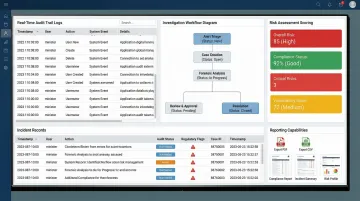
Resolver's strength lies in enterprise-scale operations and documentation rigor. It provides comprehensive audit trails and investigation management features that satisfy corporate governance requirements and regulatory scrutiny.
Recent AI-powered enhancements build on this foundation by streamlining incident intake and triage, helping security teams manage thousands of incidents efficiently. The platform integrates incident management with broader enterprise risk management frameworks, connecting safety events to financial risk, operational risk, and strategic risk assessments.
| Category | Details |
|---|---|
| Best For | Large corporate security departments and multi-site enterprises needing centralized incident management with strong governance and audit capabilities |
| Key Strengths | Enterprise scalability, robust documentation and audit trails, corporate security focus, integration with broader risk management programs |
| Considerations | Primarily focused on corporate security incidents, may require customization for specialized EHS workflows, enterprise-level investment required |
CampusOptics
CampusOptics was designed specifically for higher education institutions, providing comprehensive EHS and fire/life safety management. The platform recognizes that campus safety differs fundamentally from industrial settings, combining incident management with features specific to academic environments.
Key Differentiators:
The platform addresses the unique complexity of campus safety—research labs with chemical hazards, residence halls, athletic facilities, and campus-wide incident reporting all require different approaches. CampusOptics integrates chemical inventory management, lab safety protocols, and fire safety inspections within a single system.
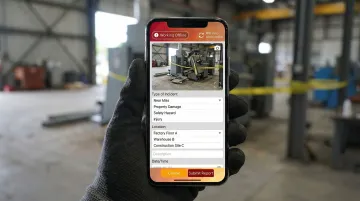
Mobile apps enable campus officers and environmental health professionals to report incidents, conduct inspections, and access chemical inventory data from anywhere on campus. The platform includes emergency pre-planning capabilities for campus facilities.
| Category | Details |
|---|---|
| Best For | Colleges and universities seeking an integrated EHS platform that addresses campus-specific safety challenges including lab safety, residence halls, and campus-wide incident reporting |
| Key Strengths | Higher education focus, integrated approach to campus EHS needs, includes chemical inventory and lab safety features, mobile accessibility for campus officers |
| Considerations | Specialized for higher education environment, may not translate well to other industries, pricing and features scaled for educational institutions |
EHS Insight
EHS Insight focuses on user adoption—the platform serves over 500,000 users across mid-size to large organizations in manufacturing, construction, and industrial sectors. The emphasis on ease of use addresses a critical challenge: even the most feature-rich platform fails if frontline workers won't use it.
Key Differentiators:
The platform prioritizes intuitive design and configurable workflows that don't require extensive IT support. Safety managers can customize forms, workflows, and reports to match their processes without waiting for vendor customization or writing code.
Strong mobile capabilities include offline functionality—workers at remote sites can report incidents, conduct inspections, and document hazards even without connectivity, with data syncing automatically when connection returns.
Customer testimonials consistently highlight the dashboard's clarity and how the mobile app encourages frontline reporting, directly improving incident capture rates and safety culture.
| Category | Details |
|---|---|
| Best For | Mid-size to large organizations across manufacturing, construction, and industrial sectors seeking a balance of powerful features and user-friendly design for frontline adoption |
| Key Strengths | User-friendly interface encouraging frontline reporting, configurable without heavy IT involvement, strong mobile app, good balance of features and simplicity |
| Considerations | May lack some advanced features of enterprise platforms, integration capabilities vary, best suited for organizations prioritizing ease of use over complex functionality |
How to Choose the Right Incident Management Software
Assess Your Compliance Requirements
Start with your regulatory obligations. OSHA-regulated organizations need platforms that generate Forms 300, 300A, and 301 automatically and support electronic submission to OSHA's Injury Tracking Application.
Emergency management agencies and hospitals require NIMS/ICS compliance for multi-agency coordination. Industry-specific regulations add another layer of requirements:
- Pharmaceutical manufacturers need 21 CFR Part 11 compliance
- Construction companies need OSHA 1926 documentation
- Utilities require NERC CIP compliance for critical infrastructure
Ensure the software provides pre-built templates and reporting formats for your specific requirements, not just generic customization options.
Evaluate User Experience for Frontline Adoption
The most common failure point isn't feature gaps—it's low adoption rates. If frontline workers find reporting difficult, incidents go unreported, and your safety program operates on incomplete data.
Critical usability factors:
- Can workers report from smartphones at the incident scene, or must they return to a desktop?
- Do remote sites lose functionality when connectivity drops?
- Can new employees report incidents after five minutes of training, not five hours?
- Does the app use photo capture, voice-to-text, and dropdown menus instead of lengthy forms?
Request trial access for actual frontline workers—not just safety managers—and measure their completion rates and feedback.
Consider Organizational Scale and Growth
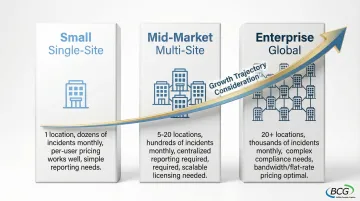
When evaluating platforms, focus less on your current size and more on where you're headed. Growth trajectory and operational complexity matter more than today's headcount.
Key scaling factors:
- Number of locations: Single-site operations have simpler needs than multi-state or international organizations requiring centralized reporting
- Incident volume: Organizations with dozens of incidents monthly need different capabilities than those with hundreds weekly
- Licensing model alignment: Per-seat pricing works for stable workforces but penalizes organizations with seasonal staff or volunteers. Bandwidth-based or flat-rate models may offer better economics
Evaluate whether the platform can grow with you—adding locations, users, and modules without requiring migration to a different system in three years.
Conclusion
Effective incident management software transforms safety data into prevention strategies. The right platform doesn't just log events—it captures near-misses before they become injuries, guides systematic investigations that identify root causes, and tracks corrective actions to completion.
It reveals patterns that inform strategic safety decisions.
Prioritize solutions that match your specific requirements:
- Emergency management agencies and hospitals need FEMA NIMS compliance and multi-agency coordination capabilities
- Manufacturing and pharmaceutical organizations benefit from integrated quality and safety platforms
- Higher education institutions require campus-specific features
- Organizations across all sectors need mobile-first solutions that frontline workers will actually use
Organizations requiring NIMS/ICS compliance and proven emergency management capabilities should explore solutions like BCG's DisasterLAN, which offers 43 years of proven performance and remains the only incident management system to achieve FEMA STEP certification.
Frequently Asked Questions
What is workplace incident management software and how does it differ from general incident tracking tools?
Workplace incident management software is designed specifically for safety and EHS teams to manage incidents (injuries, near-misses, violations) with features like OSHA reporting, root cause analysis, and corrective action tracking. General incident tracking typically refers to IT service management tools without specialized safety workflows.
What are the must-have features in incident management software for workplace safety?
Essential features include mobile reporting, automated investigation workflows, root cause analysis tools, corrective action tracking (CAPA), OSHA 300 log compliance, real-time alerts, and analytics to identify trends and prevent future incidents.
How does incident management software help organizations maintain OSHA compliance?
The software automates OSHA recordkeeping (Forms 300, 300A, 301), ensures timely incident investigation, tracks corrective actions to completion, and provides audit-ready reports. It also supports electronic submission to OSHA's Injury Tracking Application.
What is the typical cost range for workplace incident management software?
Small business solutions start at $50-150/month, mid-market solutions range from $500-2,000/month, and enterprise platforms often require custom quotes starting at $10,000+ annually. Pricing models include per-user, per-location, or bandwidth-based licensing.
Can incident management software integrate with our existing safety and business systems?
Modern platforms integrate with HR/HRIS systems, work order management, video surveillance, communication tools (email, SMS, Slack), and other EHS modules. Integration methods include pre-built connectors and API access for custom integrations.
What's the difference between cloud-based and on-premise incident management software?
Cloud-based solutions are vendor-hosted and browser-accessible, offering easier implementation, automatic updates, and remote access. On-premise solutions provide greater control over data and security but require internal IT resources for maintenance.