Introduction
Manual incident tracking creates dangerous delays. When emergencies strike, safety managers scrambling through spreadsheets and paper forms can't coordinate responses fast enough—resulting in failed compliance audits, missed incident patterns, and preventable escalations.
The stakes are rising. According to recent market analysis, the global incident and emergency management market will grow from $145.24 billion in 2024 to $235.04 billion by 2032, as escalating natural disasters and security threats drive demand for better coordination tools.
The right incident management software addresses these challenges through real-time alerting, standardized documentation, and multi-team coordination. Organizations using these tools reduce emergency response times by up to 96% and improve incident resolution by 20%.
Key Takeaways
- Free tools track, respond to, and document safety incidents with core capabilities
- Top solutions offer mobile access, real-time alerts, collaboration, and compliance reporting
- Most free tiers cap at 5-10 users with limitations on data storage, template access, and integration options
- Choose based on team size, NIMS/ICS compliance needs, and required capabilities
Overview of Incident Management Tools for Team Safety
When critical incidents occur, response teams need immediate access to coordinated information—not scattered emails and paper logs. Incident management tools are software platforms that help organizations detect, respond to, track, and analyze safety incidents in real time. These systems range from simple digital logbooks for workplace injuries to comprehensive command-and-control platforms coordinating multi-agency disaster response.
The importance of these tools has grown across emergency management agencies, hospitals, schools, utilities, corporate security departments, and first responder organizations. They support the National Incident Management System (NIMS) and Incident Command System (ICS) principles—standardized frameworks that enable coordinated response across jurisdictions.
NIMS compliance is mandatory for local, state, territorial, and tribal jurisdictions to receive federal Preparedness grants, making tool selection a financial as well as operational decision.
Understanding the difference between free and paid tiers helps set realistic expectations:
Free tools typically offer:
- Core incident tracking and basic collaboration
- Mobile access for small teams (5-10 user cap)
- Limited data retention and standard workflows
Paid versions add:
- Multi-agency coordination capabilities
- Extensive system integrations and unlimited storage
- Custom workflows and enhanced compliance reporting
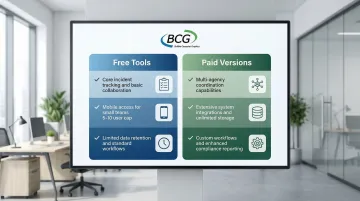
Free tiers provide viable entry points for pilot programs or small departments, but organizations should anticipate upgrade triggers as they scale.
15 Best Free Incident Management Tools for Team Safety in 2026
The following tools were evaluated for their free tier capabilities, deployment simplicity, and safety-specific features. Each offers distinct advantages for team safety management across different organizational contexts.
Tool 1: SafetyCulture (iAuditor)
SafetyCulture, founded in 2004, provides a mobile-first safety platform used by over 2 million workers globally.
Originally designed for workplace inspections, it has expanded into comprehensive incident reporting for construction, manufacturing, retail, and hospitality sectors.
The platform delivers exceptional mobile experience with offline functionality, allowing frontline workers to report incidents, capture photos, and complete checklists without connectivity.
The free tier is unusually generous compared to competitors, supporting actual operational use rather than just evaluation.
| Category | Details |
|---|---|
| Key Features | Up to 10 active users; unlimited inspections using 5 active templates; mobile app (iOS/Android) with offline capability; incident and issue reporting with media capture; basic analytics dashboards |
| Best For | Small safety teams in construction, manufacturing, retail, and hospitality requiring mobile-first incident reporting |
| Limitations of Free Tier | Capped at 5 active templates and 5GB storage; 3-year data retention limit; no integrations or Single Sign-On (SSO) |
Tool 2: Notify Technology
Notify Technology offers a dedicated health and safety mobile app designed to eliminate barriers to incident reporting.
The company focuses on making reporting so simple that workers actually use it—a common challenge in safety management.
The free app offers truly unlimited incident reporting with speech-to-text functionality that allows workers to report while their hands are occupied.
GPS tagging automatically captures location data, and offline functionality ensures reports aren't lost in areas with poor connectivity.
| Category | Details |
|---|---|
| Key Features | Unlimited incident reporting (hazards, near misses, accidents); offline functionality with GPS tagging; photo uploads; speech-to-text reporting |
| Best For | Organizations needing barrier-free hazard reporting for frontline workers across distributed locations |
| Limitations of Free Tier | Advanced SHEQ management features, dashboards, and analytics require paid platform subscription (30-day trial available) |
Tool 3: DisasterLAN (DLAN) by BCG
BCG's DisasterLAN is a comprehensive incident management system with 43 years of proven performance.
It's the first and only system evaluated by FEMA's NIMS STEP program as fully compliant with NIMS and ICS principles—a critical distinction for agencies requiring federal grant eligibility.
Key differentiators include:
- ISO/IEC 27001:2013 certification with 300+ deployments across the U.S.
- Bandwidth-based licensing that scales with organizational needs (no per-seat penalties)
- Flexible cloud or on-premise deployment for security and sovereignty compliance
- Active use by FEMA, Coast Guard, and emergency management agencies nationwide
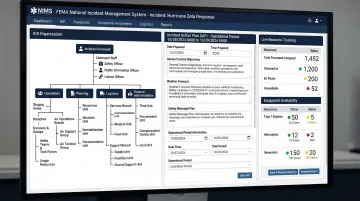
The platform offers flexible deployment addressing security and sovereignty concerns for government agencies.
| Category | Details |
|---|---|
| Key Features | Template-guided Incident Action Plans aligned with FEMA guidelines; multi-agency coordination; resource tracking; real-time situational awareness; mobile accessibility; NIMS/ICS compliance |
| Best For | Emergency management agencies, public safety organizations, hospitals, utilities, schools, and any organization requiring FEMA NIMS compliance |
| Free Tier Details | Contact BCG at (716) 822-8668 or info@bcgeng.com for demo access and pricing customized to organizational needs |
Tool 4: SHEQSY by SafetyCulture
SHEQSY, now part of the SafetyCulture family, specializes in lone worker safety—a critical concern for home healthcare workers, utility field technicians, and security personnel working without direct supervision.
The platform's QuickPanic duress alert widget enables workers to trigger emergency alerts with a single tap.
Activity timers automatically detect when workers miss scheduled check-ins, triggering escalation protocols. This proactive monitoring prevents incidents from going undetected.
| Category | Details |
|---|---|
| Key Features | Lone worker safety monitoring; duress alerts via QuickPanic widget; activity timers and check-in intervals; GPS location tracking |
| Best For | Lone workers, home healthcare staff, field service technicians, and security personnel working in isolated environments |
| Limitations of Free Tier | Integration with broader SafetyCulture platform features may be limited on standalone free version |
Tool 5: OSHA-NIOSH Heat Safety Tool
Developed by the CDC's National Institute for Occupational Safety and Health (NIOSH), this tool addresses heat-related illness—a leading cause of preventable workplace deaths in outdoor industries.
The app calculates real-time heat index based on location-specific weather data and provides risk-level recommendations (low, moderate, high, very high/extreme).
For each risk level, it suggests specific protective measures including work/rest schedules, hydration requirements, and acclimatization protocols. Being a government tool, it's free with no usage restrictions.
| Category | Details |
|---|---|
| Key Features | Real-time heat index and risk level calculation; location-specific heat safety recommendations; work/rest schedule guidance; free government tool |
| Best For | Outdoor work crews in construction, agriculture, landscaping, utilities, and any industry with heat exposure risks |
| Limitations of Free Tier | Single-purpose tool focused only on heat safety; does not manage broader safety incidents or integrate with other systems |
Tool 6: Ladder Safety by NIOSH
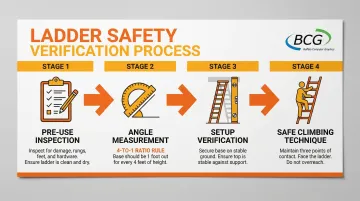
Ladder Safety addresses falls from ladders—one of the most common causes of workplace injuries and fatalities. This specialized NIOSH app provides multimodal safety tools for ladder use.
Key tools include:
- Angle measuring tool using phone sensors to verify proper ladder setup (4-to-1 ratio rule)
- Inspection checklists for pre-use equipment checks
- Graphic-oriented safety guides for climbing techniques, load limits, and hazard avoidance
Like other NIOSH tools, it's free with no restrictions.
| Category | Details |
|---|---|
| Key Features | Multimodal ladder safety tools (angle measuring, inspection checklists); graphic-oriented safety guides; proper setup verification; free government tool |
| Best For | Construction teams, facilities management, maintenance departments, and any organization with frequent ladder use |
| Limitations of Free Tier | Specific to ladder safety only; does not track incidents or integrate with broader safety management systems |
Tool 7: Crises Control
Crises Control provides mass notification and emergency alerting capabilities that reduce emergency response times by up to 96%.
The platform uses a multi-channel approach—simultaneously sending alerts via SMS, email, push notifications, and voice calls to ensure message delivery regardless of recipient location or device availability.
The SOS panic button enables staff to trigger emergency alerts instantly, while GPS location tracking helps coordinators understand where personnel are during evolving incidents.
| Category | Details |
|---|---|
| Key Features | Multi-channel alerting (SMS, email, push, voice); SOS panic button functionality; mobile app for recipients and admins; GPS location tracking for users |
| Best For | SMEs and organizations needing rapid, multi-channel emergency alerts for distributed teams |
| Limitations of Free Tier | While review sites reference a "free version," official pricing starts at approximately £2/user/year, suggesting a highly restricted free entry point or trial period |
Tool 8: Regroup Mass Notification
Founded in 2006, Regroup specializes in mass notification for schools, healthcare facilities, and municipalities.
The platform emphasizes ease of use, enabling rapid message deployment during time-critical emergencies.
Regroup's GeoFence messaging capability allows administrators to target alerts to specific geographic areas—essential during localized threats like active shooters, chemical spills, or severe weather. Integration with NOAA/NWS weather alert systems automates notifications for tornado warnings, flash floods, and other environmental hazards. Two-way communication enables recipients to confirm receipt and report status.
| Category | Details |
|---|---|
| Key Features | Unlimited templates and admin access; GeoFence messaging capabilities; two-way communication; automated NOAA/NWS weather alerts |
| Best For | Schools, healthcare facilities, municipalities, and organizations requiring geo-targeted emergency alerts |
| Limitations of Free Tier | While comparison tables reference a "free version," advanced features and higher message volumes typically require custom enterprise quotes |
Tool 9: Alertus Desktop Notification
Alertus Technologies provides enterprise-wide emergency notification with a unique focus on desktop endpoints. Through their Safe in Seconds Initiative, they offer perpetual free licenses specifically for schools and non-profit organizations.
The system delivers full-screen, audible alerts that override whatever users are doing on their computers—ensuring critical messages aren't missed because someone was in a meeting or had email minimized. Browser-based alerting for Chrome extends coverage to Chromebook environments common in K-12 settings.
| Category | Details |
|---|---|
| Key Features | Enterprise-wide perpetual license for desktop alerting; full-screen audible alerts on PCs/Macs; browser-based alerting for Chrome (K-12 focus) |
| Best For | K-12 schools, universities, and non-profit organizations requiring desktop-based emergency alerting |
| Limitations of Free Tier | Available specifically for schools and non-profits through Safe in Seconds Initiative; limited to desktop endpoints (does not include mobile alerting or other Alertus hardware) |
Tool 10: DialMyCalls
DialMyCalls provides straightforward mass notification capabilities designed for small organizations and community groups that need simple, reliable emergency communication without complex features.
The platform focuses on voice calls and text messages—channels that reach the broadest audience including those who may not use smartphones or check email regularly. This simplicity makes it accessible for volunteer coordinators, small school districts, and community organizations that lack dedicated IT staff.
| Category | Details |
|---|---|
| Key Features | Mass notification capabilities for small groups; voice call and text message delivery; simple interface designed for non-technical users |
| Best For | Small community groups, volunteer organizations, churches, and small school districts |
| Limitations of Free Tier | Likely capped by number of contacts or messages per month; limited advanced features compared to enterprise platforms |
Tool 11: Sahana EDEN
Sahana EDEN (Emergency Development Environment) is an open-source disaster management platform originally developed following the 2004 Indian Ocean tsunami. The Sahana Software Foundation has continued development, creating a comprehensive system used by NGOs and government agencies worldwide.
EDEN provides enterprise-grade modules including organization registry, resource tracking (staff, volunteers, assets), shelter management with check-in/out capabilities, and project tracking. Integrated mapping delivers situational awareness by visualizing incidents, resources, and affected populations on a common operating picture.
| Category | Details |
|---|---|
| Key Features | Organization registry and resource tracking (staff, volunteers, assets); shelter management (location, status, check-in/out); project tracking (Who, What, Where); integrated mapping for situational awareness |
| Best For | NGOs, government agencies, humanitarian relief operations, and organizations requiring comprehensive disaster management capabilities |
| Limitations of Free Tier | Requires self-hosting and technical expertise to deploy and maintain; not a turnkey SaaS solution; implementation complexity may require developer resources |
Tool 12: NICS (Next Generation Incident Command System)
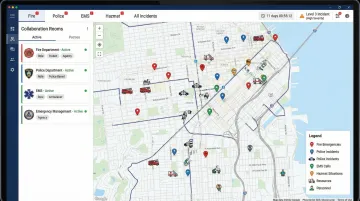
NICS, developed by MIT Lincoln Laboratory and now maintained by Worldwide Incident Command Services (WICS), provides web-based incident mapping with real-time collaboration capabilities designed specifically for first responders and emergency management agencies.
The platform enables multiple agencies to work in shared "collaboration rooms" with role-based access controls, ensuring appropriate information sharing during multi-jurisdictional incidents. The mobile app (PHINICS) functions in disconnected environments, syncing data when connectivity returns—essential for wildland firefighting and rural emergencies. The open-standards architecture supports interoperability with CAD systems and other emergency management platforms.
| Category | Details |
|---|---|
| Key Features | Web-based incident mapping with real-time collaboration; role-based collaboration rooms; mobile app (PHINICS) for disconnected environments; interoperable open-standards architecture |
| Best For | First responders, fire departments, law enforcement, and large-scale emergency management agencies requiring multi-agency coordination |
| Limitations of Free Tier | Requires significant technical resources for implementation and hosting; designed for large-scale agency coordination rather than small team use |
Tool 13: CogniCity OSS
CogniCity is an open-source platform that leverages crowdsourced disaster reporting through social media chatbots. Originally developed for flood management in Jakarta, Indonesia, it represents an innovative approach to real-time situational awareness.
The system monitors social media channels and enables citizens to report flooding, infrastructure damage, and other hazards via automated chatbots. Reports are validated and displayed on real-time web-based maps, providing emergency managers with ground-truth information that complements official sensor networks. Integration with government infrastructure data helps prioritize response based on affected critical facilities.
| Category | Details |
|---|---|
| Key Features | Crowdsourced disaster reporting via social media chatbots; real-time web-based mapping of reports; integration with government infrastructure data; citizen engagement for situational awareness |
| Best For | Urban municipalities, flood-prone cities, and emergency management agencies seeking to leverage citizen reporting for enhanced situational awareness |
| Limitations of Free Tier | Relies on public participation and social media data streams; requires technical implementation; data quality depends on citizen engagement levels |
Tool 14: InaSAFE
InaSAFE is an open-source disaster impact assessment tool jointly developed by Indonesia's National Disaster Management Agency (BNPB), the Australian Government, and the World Bank's Global Facility for Disaster Reduction and Recovery (GFDRR).
The platform generates natural hazard impact scenarios by combining scientific hazard data (earthquake shake maps, flood models, volcanic ash fall predictions) with local exposure data (population density, building locations, infrastructure). This enables emergency managers to estimate potential casualties, damage, and displacement before disasters occur, supporting evacuation planning and resource pre-positioning.
| Category | Details |
|---|---|
| Key Features | Natural hazard impact scenario generation; combines scientific hazard data with local exposure data; supports evacuation planning and response preparedness; open-source and free to use |
| Best For | Disaster planners, government agencies, and emergency management organizations focused on preparedness and risk reduction |
| Limitations of Free Tier | Focused on planning and impact assessment rather than real-time incident command; requires GIS expertise and hazard data inputs |
Tool 15: E-Plan
E-Plan provides specialized incident management tools for chemical and hazardous materials (HazMat) response. The platform maintains a comprehensive database of Safety Data Sheets (SDS) and NFPA codes, giving first responders instant access to chemical hazard information.
Chemical plume mapping capabilities allow incident commanders to model dispersion patterns based on weather conditions, helping define evacuation zones and protective action distances. Facility maps with pre-identified chemical storage locations enable faster, safer response to industrial incidents. The web and mobile accessibility ensures this critical information reaches first responders regardless of their location.
| Category | Details |
|---|---|
| Key Features | Database of Safety Data Sheets (SDS) and NFPA codes; chemical plume mapping; facility maps with chemical storage locations; accessible to first responders via web/mobile |
| Best For | Fire departments, HazMat response teams, industrial facilities, and emergency management agencies in areas with chemical manufacturing or storage |
| Limitations of Free Tier | Specialized for chemical/HazMat incidents; limited applicability for organizations without chemical hazards |
How We Chose the Best Incident Management Tools
Organizations frequently make critical mistakes when selecting incident management tools: focusing exclusively on cost while ignoring compliance requirements, overlooking mobile accessibility for field personnel, or selecting platforms that lack integration capabilities with existing safety systems.
These oversights lead to low adoption rates, compliance gaps, and ultimately wasted investment.
To help you avoid these pitfalls, our evaluation methodology prioritized these key criteria:
- Ease of deployment and use - Tools that require minimal training and can be operational quickly
- Mobile accessibility - Offline-capable mobile apps for frontline workers in areas with poor connectivity
- Real-time alerting and notifications - Multi-channel alert delivery ensuring critical messages reach responders
- Compliance with emergency management standards - NIMS/ICS alignment for agencies requiring federal grant eligibility
- Collaboration features - Multi-user and multi-agency coordination capabilities
- Reporting and documentation - Incident analysis, trend identification, and compliance documentation
- Integration capabilities - API access and compatibility with existing enterprise systems
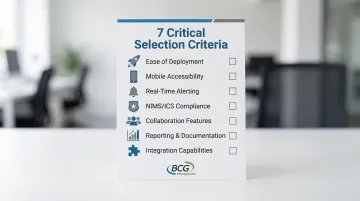
Given these criteria, the best tool choice depends entirely on specific organizational needs. A small retail chain tracking workplace injuries has vastly different requirements than a county emergency management agency coordinating multi-agency disaster response.
Consider your team size, regulatory requirements, operational complexity, and whether you need basic incident tracking or comprehensive emergency management capabilities before making a selection.
Conclusion
While free incident management tools offer valuable capabilities for team safety, the "free" label shouldn't be the primary selection criterion. Organizations should evaluate tools based on their specific operational requirements, compliance mandates, and scalability potential.
A free tool that doesn't support your compliance needs or can't scale with your organization creates technical debt and forces disruptive platform changes later.
Beyond immediate functionality, consider critical long-term factors:
- Vendor stability and track record
- Training resources and support availability
- Data security certifications (ISO 27001, SOC 2)
- Scalability as incident volume grows
Most organizations eventually outgrow free tiers as they add users, require advanced analytics, or face regulatory requirements that demand enterprise features. Planning for these transitions prevents disruption during critical periods.
Organizations with complex emergency management needs, multi-agency coordination requirements, or FEMA compliance mandates should explore enterprise-grade solutions like BCG's DisasterLAN, which offers proven performance across 300+ deployments and full NIMS compliance.
For more information about comprehensive incident management capabilities, contact BCG at (716) 822-8668 or info@bcgeng.com.
Frequently Asked Questions
What is incident management software and why is it important for team safety?
Incident management software helps organizations systematically track, respond to, and document safety incidents and emergencies. It ensures proper response protocols are followed, maintains regulatory compliance, and captures lessons learned to prevent future incidents while reducing organizational liability.
What features should I look for in a free incident management tool?
Essential features include easy incident logging, real-time notifications, mobile accessibility, basic reporting, multi-user collaboration, and secure data storage. Free tiers typically limit users to 5-10, cap data retention periods, and restrict integrations and custom workflows.
Are free incident management tools NIMS or ICS compliant?
Most free tools lack NIMS/ICS compliance, which requires standardized Incident Action Plans, resource tracking, and ICS forms. Organizations needing FEMA compliance should consider specialized systems like BCG's DisasterLAN (DLAN)—the first and only incident management system evaluated as fully compliant through FEMA's NIMS STEP program.
Can free incident management tools integrate with other safety systems?
Integration capabilities vary widely among free tools. Some offer basic integrations (email, calendar) while others provide API access or webhooks for custom connections. Many free tiers explicitly exclude integrations as a premium feature. Organizations needing extensive system integration should verify compatibility during tool evaluation and anticipate upgrade requirements.
What's the difference between incident management and emergency management software?
Incident management tools track individual safety incidents like workplace injuries or security events. Emergency management software handles large-scale emergencies and disasters with comprehensive capabilities like multi-agency coordination, resource management, and evacuation planning following NIMS/ICS frameworks.
When should an organization upgrade from free to paid incident management software?
Consider upgrading when you exceed free tier limitations (user count, incident volume, storage), require advanced features (custom workflows, extensive reporting, compliance documentation), need dedicated technical support, face regulatory requirements that free tools cannot adequately address, or require system integrations with other enterprise platforms.